

Absolute paths
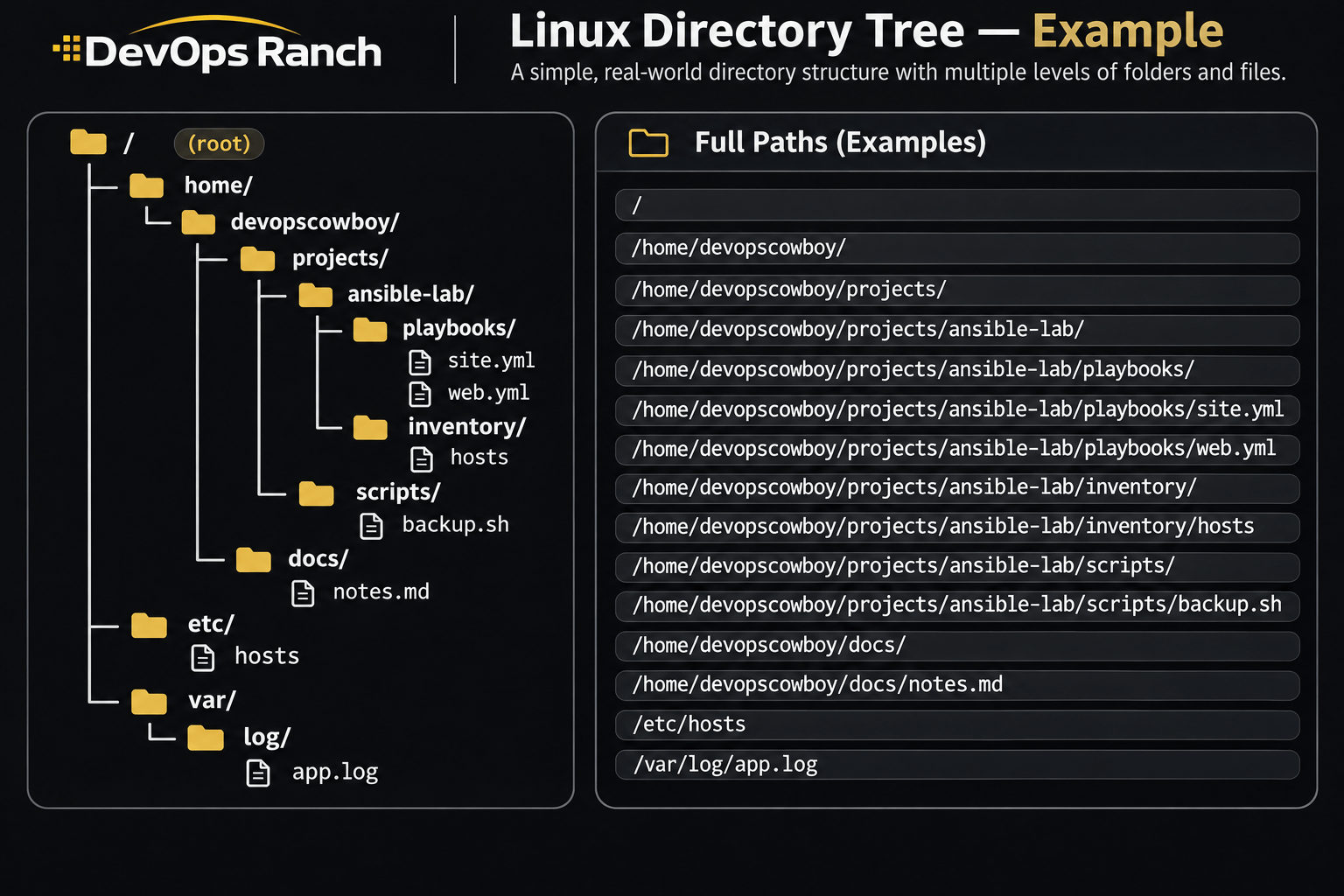
An absolute path starts with /. That slash is the root, the top of the filesystem, and the path lists every directory from there down to the file. It names the same place no matter which directory you are in.
A relative path has no leading /. It starts from the directory you are in now, the one pwd prints.
Lesson 01 · Basics
The filesystem and absolute paths
What / is, how an absolute path is built, and how a relative path starts from the directory you are in.
On this page
A path is the address of a file or a directory. You will type paths for the rest of the exam, so this lesson is the map. The commands below are the RHEL ones. The directories have the same names on RHEL 7, 8, 9, and 10.
The examples use the account devopscowboy. On your machine, use your own username.
The short list of the same commands is the Getting Around cheat sheet.
A path is an address
Every file on the host sits inside a directory, and that directory sits inside another, all the way up to one directory that contains everything else. That top directory is /, pronounced “root” or “slash”.
Read a path from left to right. Each piece between slashes is the next directory down.
/home/devopscowboy/projects/ansible-lab/playbooks/site.yml
| Piece | What it names |
|---|---|
/ |
The top of the filesystem. |
home |
The directory that holds user homes. |
devopscowboy |
One user’s home. |
projects |
A directory that user made. |
ansible-lab |
One project. |
playbooks |
A directory of playbooks. |
site.yml |
A file in that directory. |
There is no drive letter. / is the start of every absolute path on the host.
Absolute paths start with /
An absolute path begins with /. It lists every directory from the root down to the file. It means the same place no matter which directory your shell is in.
/etc/hosts is the hosts file, whether you are in your home directory or in /tmp. cd /etc lands in /etc from anywhere, because the path starts at the root instead of at your current directory.
/ by itself is the root directory. It is the top of the tree. It is a directory you can list.
/ and /root are different
/ is the root of the filesystem. /root is the home directory of the root user, one level down, the same way /home/devopscowboy is the home of an ordinary user.
People mix these up because both use the word “root”. When a path starts with / and the next piece is root, you are in the administrator’s home, not at the top of the tree.
ls -ld / /root
The first name is the top of the filesystem. The second is a directory inside it. As a normal user, listing /root often answers Permission denied. That answer still tells you the two paths are not the same place. Listing / works.
The picture
The picture is one home directory on a Linux host, plus /etc and /var. The panel on the right is the absolute path of every directory and file in the tree.
Take the playbook in the picture:
/home/devopscowboy/projects/ansible-lab/playbooks/site.yml
That string is the whole address. You can hand it to ls, cp, or cd from any directory and it still means that file. The directory that holds the file is the path with the filename removed:
/home/devopscowboy/projects/ansible-lab/playbooks
Relative paths start where you are
A relative path does not start with /. It starts from the directory you are in now, the one pwd prints.
If pwd prints /home/devopscowboy/projects/ansible-lab, the same playbook is:
playbooks/site.yml
cd playbooks moves into the folder that holds site.yml and web.yml. That only works when playbooks is here. From /etc, the same cd playbooks fails, because /etc has no playbooks directory. cd /home/devopscowboy/projects/ansible-lab/playbooks still works from /etc, because that path starts at /.
Two names show up inside every directory:
.means the directory you are in...means the parent, one level up.
From playbooks, cd .. moves back up to ansible-lab. From ansible-lab, cd .. moves up to projects. You can stack them: cd ../.. goes up two levels.
/etc/hosts and /var/log/app.log in the picture are absolute too. A relative path cannot name them from inside ansible-lab without climbing all the way to / and back down. The absolute path is the one you want for those.
The top of a RHEL system
These are the directories directly inside /. The names are the same on RHEL 7, 8, 9, and 10.
| Path | What it is |
|---|---|
/ |
The root of the filesystem. Every other directory is inside this one. |
/home |
Home directories for ordinary users, such as /home/devopscowboy. |
/root |
Home directory of the root user. A different directory from /. |
/etc |
Host configuration. /etc/hosts and /etc/fstab live here. |
/var |
Data that changes while the system runs: logs, caches, and spools. |
/var/log |
Log files. On RHEL, system messages go to /var/log/messages. SSH and sudo go to /var/log/secure. |
/tmp |
Scratch space. Anyone can create a file here. RHEL removes files that have not been used for 10 days. |
/usr |
Installed programs and the files they share. Most commands you type live in /usr/bin. |
/bin and /sbin |
Essential commands. On RHEL 7, 8, 9, and 10, /bin and /sbin are links to /usr/bin and /usr/sbin. |
/opt |
Add-on applications that are not part of the base system, usually one directory per product. |
/dev |
Device files. A disk shows up as a name like /dev/sda. |
/proc |
Live kernel and process information, such as /proc/cpuinfo. Nothing here is stored on disk. |
/boot |
Files the host needs in order to boot: the kernel and the GRUB bootloader. |
/mnt and /media |
Places to attach another disk. Use /mnt for a mount you make by hand. A USB drive on RHEL usually appears under /run/media. |
You do not need to memorize every row tonight. You do need /, /home, /root, /etc, /var, /tmp, and /usr cold. The rest of the exam keeps sending you there.
See it with three commands
pwd prints the absolute path of the directory you are in. Run it before you copy or delete anything.
pwd
ls lists names. ls -l is the long list: permissions, owner, size in bytes, and date. A directory’s long listing starts with d. That is how you know a name is a directory. ls -l /tmp is the check.
ls -l /tmp
cd changes the directory. A path after cd that starts with / is absolute. A path with no leading / is relative, so it only works when that name is in the current directory.
cd /tmp
pwd
cd /home/devopscowboy
pwd
After cd /tmp, pwd prints /tmp no matter where you started. That is what “absolute” means.
The next lesson stays on these commands and adds the rest of the forms (cd .., your home directory, hidden names). Then the lab has you do it on a RHEL virtual machine.